- Packages
- Environments (Beta)
- Models
1
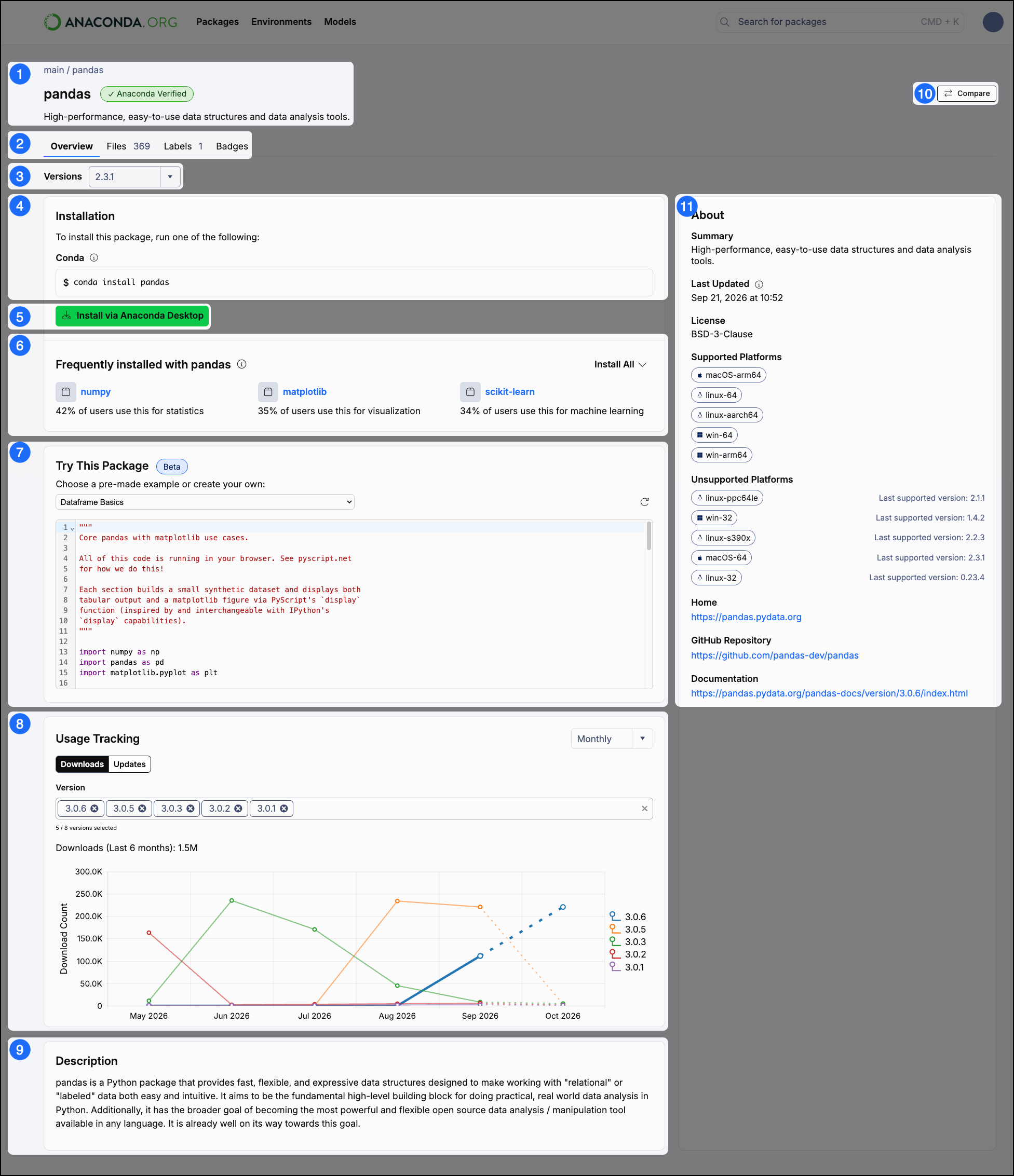
Package introduction
This section contains:
- Breadcrumbs linking back to the package’s channel (channel / package). Select the channel to view its homepage.
- The name of the package.
- A badge describing whether the package is or built.
- A short package description.
2
Tabs
A set of tabs giving you access to more package information:
- Overview
- General information further outlined in the descriptions below. Selected by default.
- Files
- Lists of package archive files (such as
.condaand.tar.bz2) that you can download. - Labels
- A list of package labels created by the package maintainer.
- Badges
- A list of badges relevant to the selected package and resources for embedding the badges in your web page.
Packages from the conda-pypi channel display a simplified detail page with the Overview and Files tabs only. The Labels and Badges tabs are not available for conda-pypi packages.
3
Version
Use the dropdown to select the package version you want to download. The information on the Overview tab changes when the version changes. The latest version is selected by default.
4
Installation
Installation commands for the package version selected. Select the command to copy it for use in your command line interface (CLI).
5
Install via Anaconda Desktop
Click Install via Anaconda Desktop to install this package into your environment using Anaconda Desktop. For more information, see Packages.
6
Frequently installed with
Not every package has recommendations. This section only appears for packages where sufficient data is available.
How recommendations are calculated
How recommendations are calculated
Recommendations are generated using a statistical measure called Normalized Pointwise Mutual Information (NPMI), which identifies packages that appear together in conda environments more often than you would expect by chance. Unlike raw co-install frequency, which tends to surface obvious, widely popular packages, NPMI accounts for each package’s individual popularity. This allows the engine to surface non-obvious, domain-specific tools alongside well-known packages.The analysis is based on user-specified installs only, meaning packages that users explicitly chose to install rather than packages pulled in automatically by the dependency solver. This ensures that recommendations reflect intentional usage patterns. Anaconda processes hundreds of millions of install events across tens of thousands of packages to compute these scores. Recommendations are ranked by their NPMI score, with the strongest co-installation signals appearing first.Each recommended package is also assigned a category label (such as “data analysis” or “modeling”) derived from the package’s description and metadata. The recommendation data is refreshed weekly using a rolling 365-day window of install activity.
7
Try This Package Beta
This feature is only available for certain packages.
8
Usage Tracking
Use the Downloads and Updates tables to view the usage statistics for your selected package.
- Downloads table
- Compares download numbers within the last six months. Use the Version dropdown above the table to add or remove package versions you want to compare.
- Updates table
- Displays number of updates released by the package’s maintainers. Select Monthly to view updates within the last four months or Weekly to view updates within the last six weeks.
9
Description
A description of the selected package.
10
Compare button
A Compare button for comparing this package to others. For more information, see Comparing packages.
11
About
General information about the selected package, including the date and time when the package was last updated, the package’s license, supported (and unsupported) platforms and architectures, and relevant links for more information about the package.