

An Anaconda account and a token with appropriate permissions are required to access other users’ private packages. For more information, see Tokens.
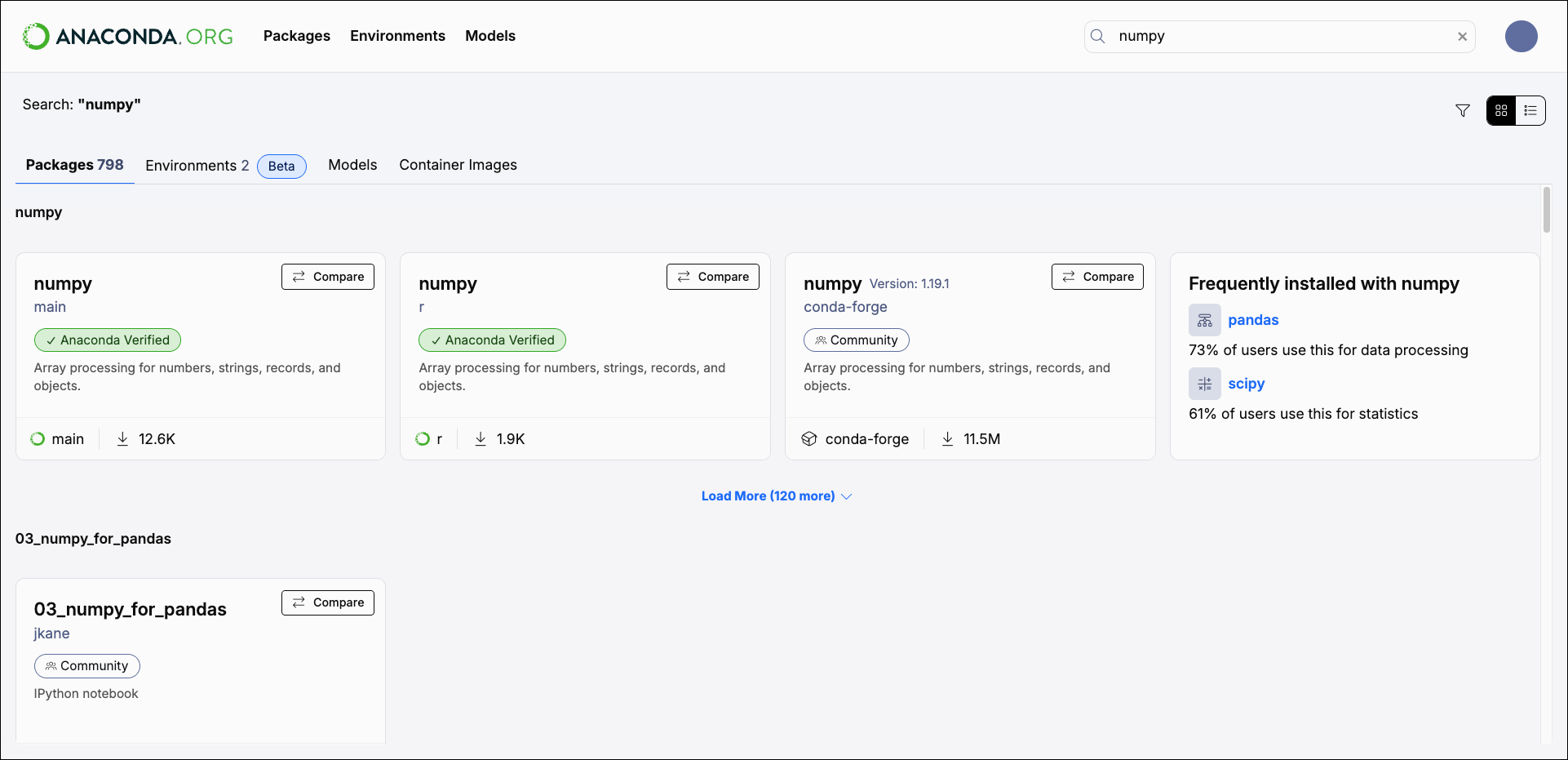
Frequently installed packages
When you search for a package, Anaconda.org can show you packages that are frequently installed alongside each result. These recommendations appear as a “Frequently installed with” card attached to package results in the search view. Each recommendation includes a percentage and a package category, such as data analysis or modeling. Each card shows up to two recommended packages. Select a recommended package name to open its detail page, or use the Install dropdown to copy the terminal install command.Not every package has recommendations. The “Frequently installed with” card only appears for packages where sufficient co-installation data is available.
Filtering search results
Select the filter icon to open the All Filters menu. The available filters vary depending on whether you are searching for packages, environments, or models.- Packages
- Environments (Beta)
- Models
- Access
- Whether the package is public or private. You need a specific token to view other users’ private packages. For more information, see Tokens.
- Channel
- The channel that contains the package. This list contains Anaconda channels (such as
main), conda-forge, conda-pypi, and other community and user channels. - License
- The license applied to the package.
- Platform
- The platform or system architecture (for example,
linux-64,osx-arm64,win-64). “Noarch” packages are built to work on all platforms. - Type
- The package type.